


Grok AI
4.843.44K Reviews
App Specs
- Version
- 1.1.95-release.00
- Updated On
- License
- Free
- Downloads
- 100,000,000+
- Developer
- xAI
- Categories
- Productivity
- Platform
- Android, iOS
Screenshots
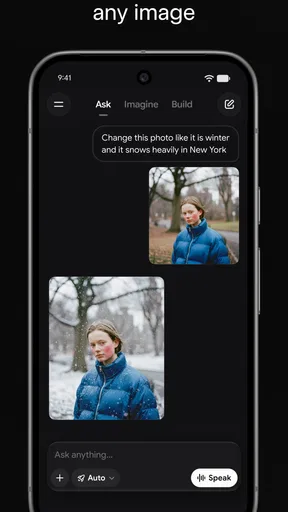
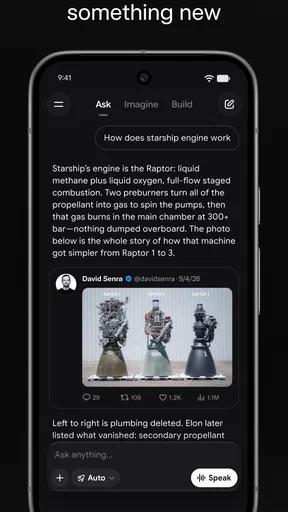
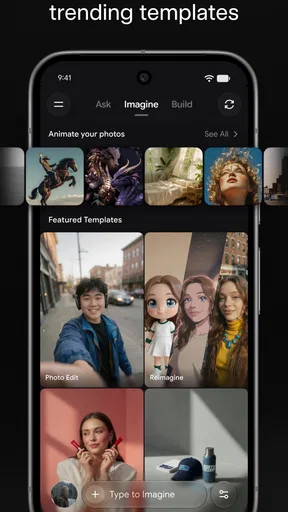
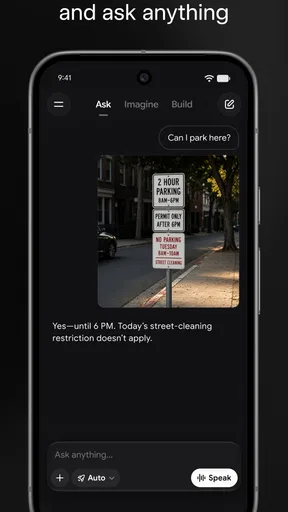
 Analysis by AppCompare
I reach for an AI assistant when I have a question that is too small to justify a full research session but still needs more than a quick guess: a confusing term, a rough plan, or a first draft of an idea. Grok • Smartest AI Advisor is aimed at that everyday gap. It is a free productivity app from xAI, and its appeal is the chance to ask in ordinary language, then use the answer as a starting point rather than opening several separate tools.
Where it fits in an ordinary day
A realistic use is planning a busy afternoon. I might describe the errands I need to do, the time I have, and what must happen first, then ask for a sensible order. That kind of prompt gives the assistant useful context; “plan my day” alone leaves too much room for assumptions. I would still check travel times and fixed appointments myself, but getting a rough sequence can make the next step clearer.
The same approach works for learning or writing. I can ask for a plain-language explanation, request an example, and then follow up on the part that remains confusing. For a message or outline, I would give the intended audience and tone, then edit the result so it sounds like me. The practical advantage is a faster first pass, not a finished answer that never needs checking.
From question to useful outcome
In my experience, the quality of the exchange depends on how clearly I describe the outcome I want. A broad question may produce a broad answer. Adding constraints—such as the audience, available time, or format—usually gives the conversation a more useful direction. If the first response misses the point, a specific follow-up is often better than starting over with a completely different prompt.
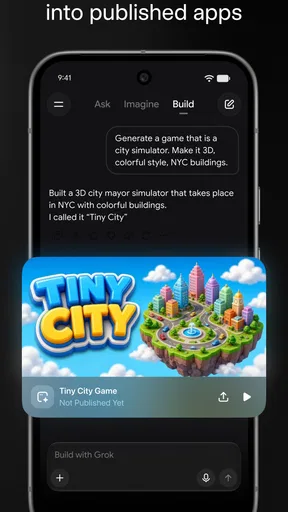
Grok can also generate images, which makes it useful when a visual idea is easier to explore than to describe. I would treat an image as a draft or a source of inspiration, then decide whether it fits the actual task. For anything that needs exact factual detail or a consistent brand style, review matters: a striking result is not automatically an accurate or ready-to-publish one.
Its connection to real-time information from X is another reason some people may choose it over a general-purpose assistant. That can help when I want to explore what people are discussing there, but a live conversation is not the same thing as an independently verified source. I use it as a way into a topic, then check important claims against reliable references before acting on them.
Who should give it a try
Grok makes most sense for curious people who want one conversational place to brainstorm, ask follow-up questions, explore current discussion on X, or produce an initial image. It may be particularly handy for students organizing their thoughts, workers turning a vague task into a first outline, or anyone who likes to learn by asking questions in their own words. The app is rated for Teen audiences, so families should still make their own judgment about whether its conversational and image-generation tools suit a young user.
Worth Reading Before You Choose

Baby Panda World Brings Quick Play to Modern Phones, but Its Game Library Feels Busy

ESPN’s Live Game View Makes Following Close Games Easier

QuizzLand Review: A Good Fit for Short Trivia Breaks, Not Every Player

Basketball Stars: Multiplayer Is Fast, but Can It Recover When Matches Go Wrong?

WEBTOON Turns Phone Updates Into a Better Reading Routine

Link to Windows Runs on Shared Habits, Not Social Feeds
If your priority is a dependable calendar, task list, or document editor, I would use the dedicated tool for that job. An AI conversation can help me think through what to do, but it is not a substitute for a structured system that reliably stores deadlines and tracks completed work. Likewise, someone who needs carefully sourced answers for professional, medical, legal, or financial decisions should not treat a fluent response as expert confirmation.
How it compares with familiar alternatives
Compared with a conventional web search, Grok is more conversational: I can ask a follow-up without rebuilding the search from scratch, and use it to shape a rough answer or image. Search remains better when I want to inspect original pages, compare sources, or verify a specific claim directly. Compared with a standard productivity app, Grok is more flexible for open-ended thinking but less suited to keeping an organized record of tasks. I see it as a companion to those tools, not a replacement for all of them.
That distinction is worth keeping in mind when a conversation turns into a work handoff. I might ask for a project outline, copy the useful points into my notes, and then assign dates or owners in the tool my team already uses. The extra step is a little friction, but it also gives me a chance to check the plan before it becomes a commitment. I would not assume an answer has been saved to a calendar or shared elsewhere unless I have actually moved it there.
First Impressions
When I first downloaded Grok • Smartest AI Advisor, I wasn’t quite sure what to expect. I mean, "smartest AI advisor" sounds promising, right? The interface is sleek, and everything feels intuitive. It’s like they’ve designed it with the user in mind, which is refreshing.
After a quick setup, I was greeted by a friendly AI that seemed ready to tackle any question or task I threw its way. From the get-go, it felt less like an app and more like a conversation with a knowledgeable buddy.
Features That Stand Out
There are a few features that really make this app shine. First off, the ability to ask almost anything and receive a coherent, insightful response is a game-changer. Whether it’s planning your next vacation or figuring out the best way to organize your workflow, Grok’s got you covered.
Another nifty feature is its integration with other apps and tools. It seamlessly syncs with calendars and task managers, making sure you’re always on top of your game. Oh, and if you’re into learning new things, Grok can throw in some random fun facts or useful tips throughout the day. It’s like having a personal coach who’s also a trivia master!
User Experience
Using Grok is a breeze. The app’s navigation is straightforward, and the design is clean without being boring. I’ve found myself using it more and more just because it’s so darn easy to interact with. The voice recognition is surprisingly accurate, which is a big win if you’re always on the move and need hands-free assistance.
The AI's responses are quick and feel organic. It doesn’t bombard you with robotic answers; instead, it provides thoughtful insights that actually make sense. It’s almost like it knows what you’re thinking—or maybe I’m just projecting!
Checking the fit before committing
For a better sense of the app’s place among AI tools, it helps to separate the work it does well from the work that still needs another destination. A conversational assistant is useful for exploring possibilities; a dedicated calendar is better for preserving a schedule, and a search engine is better for opening and comparing source material. I would start in Grok when I need help framing a question or generating options, then move the final decision into the appropriate tool.
That handoff is also a useful accuracy check. If I ask for a trip plan, for instance, I can use the response to make a shortlist of places and questions, but I would verify opening hours, routes, and booking details before relying on them. For a work process, I would ask it to separate assumptions from confirmed details, then check the latter against the documents or people responsible. A polished answer can make uncertainty easy to overlook, so I try to keep the original question and the evidence in view.
Image generation calls for a similar review. I would describe the subject, mood, and intended use, then judge the result against that purpose rather than treating visual polish as proof that it is suitable. If I need a very particular composition, I would make the request more concrete and expect to refine the idea. This is a creative shortcut, not a guarantee that the first output will match a detailed brief.
Small habits that make answers more useful
One practical habit is to include constraints at the start: who the answer is for, what it should help accomplish, and what limits matter. For example, a meal-planning prompt becomes more useful if I mention dietary needs and the ingredients already on hand. I would still check the ingredients and any health-related advice rather than treating a generated suggestion as authoritative.
Another is to ask for a format that supports the next action. A short checklist is easier to transfer into a task manager than a long stream of prose; a comparison with explicit criteria is easier to inspect than a confident recommendation with no reasoning. If I am using information tied to discussion on X, I would ask what is known versus what is speculation, then verify anything consequential elsewhere. These steps do not eliminate errors, but they make the output easier to review and use.
Grok is free to download, though it also offers in-app purchases priced from around thirty dollars to around three hundred dollars per item. I would begin with the free app and decide whether the way I use it justifies paying for anything; the existence of purchases alone is not a reason to assume they are necessary. It has an average rating of 4.9 from around 1.9 million ratings, and has been installed over 50 million times. Those figures suggest broad interest, but they cannot tell me whether its answers suit my own needs.
The app was released on March 24, 2025, and its current version is 1.0.97-release.08. It requires Android 9 or later. I would check that requirement before trying to install it on an older device, and keep the app updated when using it regularly so I am working with its current release. Its popularity does not remove the usual need to review AI-generated text and images before sharing them.
Where the flow can break
The main weakness is not a complicated interface; it is the temptation to trust a smooth answer too quickly. An assistant can sound certain while misunderstanding a detail, and current conversation on X can be noisy or incomplete. If the outcome affects money, health, work commitments, or someone else’s reputation, I would use Grok to organize questions rather than make the decision for me.
There is also a practical limit to using one conversation as a whole productivity system. Ideas may need to be copied, checked, and assigned somewhere else, and that handoff takes attention. If I already have a reliable workflow built around notes, tasks, and references, switching contexts just to ask an assistant may not save time. The best test is whether it helps me move forward without creating more cleanup than the task deserves.
Final Thoughts
All in all, Grok • Smartest AI Advisor is a solid pick if you’re looking for an app that can boost productivity while also offering a dash of fun. It’s reliable, user-friendly, and most importantly, it feels like it’s designed to genuinely help you out. Whether you’re a tech-savvy individual or someone just dipping their toes into AI, Grok has something to offer.
So, if you’re curious and want a trusty AI sidekick, why not give Grok a try? It might just become your new favorite app!
Pros
- Intuitive interface for easy navigation.
- Offers personalized recommendations.
- Supports various languages.
- Quick response from AI advisor.
- Frequent updates with new features.
Cons
- Requires stable internet connection.
- May have occasional AI inaccuracies.
- Limited offline functionality.
- Subscription model for premium features.
- Not all features are available on iOS.
FAQs for Grok AI
What is Grok • Smartest AI Advisor and how does it work?
Grok • Smartest AI Advisor is an intelligent application designed to provide users with tailored advice and insights on various topics. It uses advanced AI algorithms to analyze data and deliver personalized recommendations. The app learns from user interactions, continually improving its advice to better suit individual needs.
Is Grok available on both Android and iOS platforms?
Yes, Grok • Smartest AI Advisor is available for download on both Android and iOS platforms. Users can find the app on the Google Play Store and Apple App Store, ensuring a seamless experience across different devices. The app is designed to be user-friendly and accessible on a wide range of smartphones and tablets.
What are the main features of Grok • Smartest AI Advisor?
Grok offers a range of features including personalized advice, real-time data analysis, and an intuitive user interface. Users can receive insights on topics like finance, health, and technology. The app continuously updates itself to provide the latest information, ensuring that the advice is relevant and up-to-date.
Are there any subscription costs or in-app purchases associated with Grok?
Grok operates on a freemium model. While the basic features are free to use, there are premium options available that provide access to advanced functionalities and more personalized advice. Users can opt for a subscription plan that best fits their needs, with various pricing tiers available.
How does Grok ensure user privacy and data security?
Grok prioritizes user privacy and data security by implementing robust encryption protocols and adhering to strict data protection regulations. The app collects only essential information and offers users control over their data. Regular updates are provided to enhance security measures and protect user information from unauthorized access.


